
In software development, automated tests are essential for ensuring that applications function reliably and without errors at all times. They provide both end users and development teams with assurance and confidence in the quality of the software. Kent C. Dodds’ Testing Library, in particular, has established itself in recent years as a powerful tool that goes far beyond traditional unit tests. It focuses on testing applications based on web technologies such as React, Angular, Vue, and React Native.
In this post, our Xperts explain why testing is so important, what principles underpin the Testing Library, and how it helps ensure software quality. Automated tests are an integral part of our build process, ensuring that an application meets our high quality standards before it is released to end users.
Why test?
Testing is an integral part of successful software development and serves many important functions:
- Ensure functionality: Tests ensure that an application works as intended. If the application behaves unexpectedly, it is important that the tests fail.
- Documentation: Tests document the application's behavior. They serve as living documentation that describes how the application behaves in specific scenarios.
- Automation: Automated tests prevent developers from overlooking important steps in the testing process.
Tests therefore serve two key purposes:
- They ensure that the software works reliably for end users.
- They help development teams ensure that no important details are overlooked, while also saving valuable time. In addition, testing boosts developers' confidence in their work. It allows them to better assess whether the required quality standards are being met.
Building Trust Through Testing
However, tests can only build trust if they are meaningful and realistic. One of the biggest challenges in creating tests is ensuring that they not only verify isolated units but also reflect the actual use of the application.
Inadequate tests can often be identified by the fact that, for example, all imports are simulated (mocking), data is used that does not appear in the real application, or shallow renderings are performed in which child components are also simulated. The more comprehensive and realistic tests are, the more meaningful they are.
When tests are more meaningful, the likelihood increases that they will actually fail when a bug is present. As a result, the development team gains confidence in both the tests and the application.
In summary, to build trust in tests, it is crucial that they not only verify isolated functionalities but are also aligned as closely as possible with how end users actually use the product. This is where Testing Library comes in; it was specifically developed to bridge this gap. It helps development teams design their tests to be more realistic—with a focus on users—thereby increasing the validity of the tests and building confidence in the entire application.
What is Testing Library, and where does it come from?
The Testing Library is a collection of testing utilities created by Kent C. Dodds, a JavaScript developer and educator. It was developed to improve the way developers test user interfaces (UIs). The Testing Library follows this principle: The closer your tests are to how your software is actually used, the more confidence they can give you. This principle emphasizes the importance of designing tests to reflect actual user behavior as realistically as possible, in order to increase the validity of the tests and confidence in the software.
Kent C. Dodds developed the Testing Library in response to traditional testing methods, which often focus too heavily on internal implementation details and less on the actual user experience. He wanted to create a tool that would align tests more closely with the actual interactions that end users have with the software.
The Principles of Testing Library
- Real-world tests: The main goal of Testing Library is to design tests that closely mimic real-world software usage. This increases the validity of the tests and builds greater confidence in the results.
- Framework independence: The Testing Library is not limited to any specific JavaScript framework. It offers implementations for various frameworks such as React (React Testing Library), Angular (Angular Testing Library), Vue (Vue Testing Library), and also for generic DOM testing, such as for Cypress (Cypress Testing Library). This makes it versatile and widely applicable—it is therefore framework-agnostic.
- Focus on Accessibility: A key concept of Testing Library is the prioritization of accessibility queries. These queries simulate the interactions that users would perform with a screen reader or other assistive technology. This ensures that the core structure of the application is accessible to users with disabilities.
- Minimal knowledge of internal details: Testing Library encourages writing tests that require little to no knowledge of the components' internal details. Instead, the focus should be on the visible and accessible parts of the UI. This promotes better test maintainability and prevents tests from failing due to changes in the implementation that are irrelevant from the user’s perspective.
- User-Centered Interactions: Instead of triggering specific DOM events directly (e.g.,.
fireEvent.click), Testing Library recommends usinguserEvent, which simulates more realistic user interactions. As a result, the tests are more robust and more closely reflect users' actual experiences.
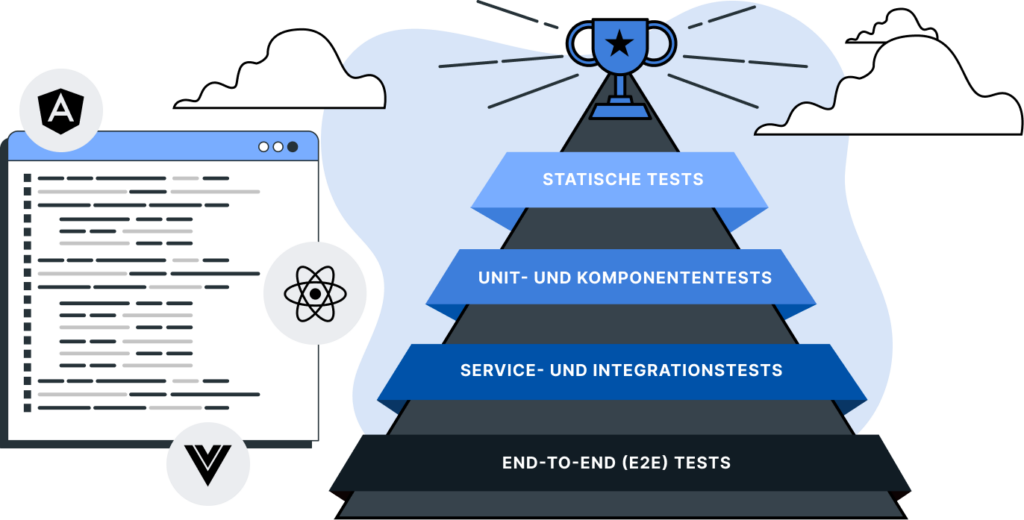
These principles are also reflected in the Testing Trophy, developed by Kent C. Dodds, a modern alternative to the classic testing pyramid. The Testing Trophy focuses on the return on investment (ROI) of testing and emphasizes the importance of integrative testing.
Testing Trophy

- Static Tests: Tools such as ESLint, Typed Languages, and Sonar analyze the code without executing it.
- Unit and Component Tests: These tests check individual functions or components in isolation.
- Service and Integration Tests: Tests that verify the interaction of multiple components or systems.
- End-to-End (E2E) Testing: These tests simulate the entire process from the end users' perspective.
Key Tools and Concepts of the Testing Library
- Queries: The Testing Library provides various query methods, such as
getByRole,getByLabelTextorgetByText. These methods are ranked by priority, with the queries that most closely match the actual use of the application (e.g.,.getByRole), should be given preference. - userEvent vs. fireEvent:
userEventsimulates more complex interactions that reflect actual user behavior, whilefireEventtriggers DOM events directly.userEventis preferred because it covers more realistic scenarios. - Jest-DOM: This is an extension of Testing Library that provides additional matchers for Jest (a JavaScript testing framework). It enables simple checks of the DOM state, such as
toBeVisible,toHaveTextContentand others.
Example
To make the Testing Library easier to understand, our Xperts have developed a concise example. It makes use of all the tools and concepts mentioned earlier: the example tests a component with interactive elements. The example is implemented in Angular, but can easily be adapted to other frameworks.
The component
We'll start with a template for our sample component. It includes various headings as well as a „Tip of the Day,“ which can be hidden by clicking a button.
As usual, the logic is contained in the component's TypeScript. Here, we've implemented an action that is triggered by clicking a button, as well as a signal that makes the template reactive. We've already used signals in our Blog presented.
The Tests
As part of the test, we want to ensure that the initial state meets our expectations. In an additional test, we want to verify that the "Tip of the Day" is correctly hidden when a user clicks the hide button.
Setup
We'll start with the setup so that we can then focus on the actual tests. During the setup, we initialize userEvent, to trigger interactions by a potential user within the tests. The component is then rendered using the Testing Library's `render` method. At this point, inputs or the test environment itself can also be configured. Using a `setup` method is similar to the recommended setup when writing tests with userEvent wants to write (Link).
Test of the Initial State
Using our setup method, we can now write our tests. We’ll start with the test designed to verify the initial state. Through the setup, we trigger a rendering and wait until it has completed. Next, we query the screen—a global object in the Testing Library—and the underlying queries to retrieve the individual elements in our test environment. Since we’ve assigned many roles using corresponding HTML tags in the template definition, we can use them as follows.
For example, this allows us to <h1>-Element via the query getByRole("heading", { level: 1, name: "Hello Blog" }) received. Here, it can be seen that the text content of the heading is set using the option name can be queried at the same time, making our query even more precise.
In addition, we can query elements directly based on their text content. In the following test section, we'll show you how to check an element's visibility: To do this, we'll use the getBy-Query along with toBeVisible, to ensure that an element is visible. If, on the other hand, we want to check that an element is not visible, we use the queryBy-Query in combination with not.toBeInTheDocument.
In the last section of our first test, we use the Jest DOM matcher toBeDisabled, to ensure that the button for hiding the content is active and clickable from the start. One advantage of these matchers is that they allow us to verify the correct ARIA attributes as well—this ensures that at least the basic accessibility requirements are met and that users who rely on screen readers can navigate the site.
Test with Interactions
In the second test, we'll check using userEvents and our simulated user, to see if the "Tip of the Day" disappears when the button is clicked. As usual, we first see the call to our setup. Then we check the state before the interaction using toBeVisible and not.toBeInTheDocument.
Next, the button is clicked. We wait for this using the keyword await . This gives us the updated UI directly on the screen—without having to worry about responsiveness. Finally, we check whether the „Tip of the Day“ has disappeared and whether the message indicating that the tip has already been viewed is displayed instead. The button should also now be disabled and no longer allow any further interactions.
Conclusion
Overall, it can be said that Testing Library is playing an increasingly central role in modern software development projects. It enables the creation of tests that are realistic and meaningful, which in turn builds confidence in the quality of the software. The Testing Library has helped bring user-centered testing and accessibility more into the spotlight, thereby assisting development teams in creating high-quality, user-friendly applications. Some tests may be slower than strict unit testing, but they offer greater insight.
The important thing to remember here is that there is no „right“ or „wrong.“ The tests should always be tailored to the requirements of the product and the development team. Ultimately, the goal is for the tests to build confidence in the software’s functionality and reliability.