

In the fast-paced world of agile software development, teams are always looking for new ways to boost their efficiency and effectively tackle daily challenges. Artificial intelligence (AI) plays a crucial role in this, especially when it comes to optimizing the entire testing process and actively supporting developers. That’s why our Xperts are taking a closer look at various AI tools for test generation today.
History and Variations
Before we delve deeper into the examples, we’d like to provide a brief overview of AI research to help put things into context. In the early days, there were no concrete applications yet—only the desire to create computers capable of mimicking human thought. The term „artificial intelligence“ was first used at the so-called Dartmouth Conference in 1956, which is considered the birth of AI.
However, after an initial boom, progress stagnated starting around the mid-1970s, as reality failed to live up to the results. Driven by LISP machines and expert systems, AI research experienced a resurgence in the 1980s. However, the euphoric sense of optimism subsided again in 1987, and the field slowly recovered throughout the 1990s. Machine learning brought about the first applications with a wide range of uses, such as search engines and spam filters. Here, continuous improvement of the systems is achieved through intensive training with experience—that is, data.
After 2000, deep learning finally led to a breakthrough in object recognition by computer programs. These systems are trained using extremely complex deep neural networks (DNNs). The next major step came in 2014 with the emergence of Generative Adversarial Networks (GANs). GANs are capable of generating new data that is virtually indistinguishable from real data. With the advent of Large Language Models (LLM) With AI-based applications such as ChatGPT, we have, for the time being, arrived in the future.
However, it is impossible to predict with certainty where AI development is headed. Milestones have repeatedly been followed by setbacks. Even though AI is currently being implemented almost everywhere, it remains unclear what impact this will have on AI research as well as on us as humans. The only thing that seems certain is that anyone who wants to remain competitive in the future will have no choice but to use AI tools—even in the IT industry. See our Expert Interview as well as our blog post Help me—AI is taking my job.
VisualAI
This form of AI is specifically designed to understand and generate visual information. VisualAI has the ability to identify objects and recognize patterns, which is why it is used in numerous industries (e.g., medicine, the automotive industry, retail, and security). However, its capabilities also make it attractive for quality assurance in software development. Popular applications include AskUI, Haelenium, Eggplant, Maestro, and Applitools.
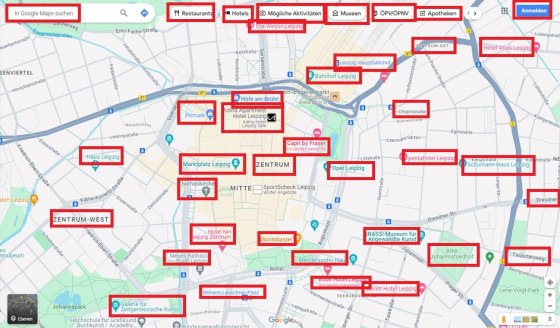 Example: Google Maps
The increasing use of Canvas objects is causing ever-greater problems in front-end testing—problems that can no longer be managed in the long term using conventional testing methods. These tests are usually based on traversing the DOM tree, which does not exist in Canvas. Graphics are drawn at the pixel level here and are not represented as individual DOM elements. By using a VisualAI tool, it is possible to identify these Canvas objects. For example, you can have AskUI analyze a screenshot of an application. Using deep learning, the tool recognizes patterns and then segments the objects. This allows for the creation of GUI maps, bringing us as close as is currently technically possible to human-computer interaction. Code selectors are also no longer needed, as the analysis relies solely on visual features.
Writing Test Cases
For many developers, writing code is a creative challenge. But when it comes to testing the code they’ve written, writing tests is sometimes seen as repetitive and monotonous. This is exactly where GPT can be helpful, according to our experts. For less demanding tasks, such as unit tests, AI tools can handle a great deal of the preliminary work. This saves developers time and increases their efficiency.
But what does that look like in practice?
Basically, you send GPT a request (prompt) to write a unit test and also provide the corresponding HTML and JavaScript code. Using a framework such as, for example,. LangChain The code can also be sent directly to GPT. New code is checked in and forwarded directly to GPT via a pipeline-like structure. The results are then retrieved and pushed to a branch. Developers and testers can then review the automatically generated tests in accordance with the proven dual-review principle.
XRay Test Cases for Quality Assurance
In agile software development, individual teams are often faced with bureaucratic challenges. The constant back-and-forth of tickets and the maintenance of extensive ticket descriptions can be extremely time-consuming. Onboarding, comments, documentation, and reports to management—the list seems endless. Sometimes administrative tasks and permission issues are thrown into the mix as well. The good news: The agile process offers a wide range of opportunities to implement AI tools in various project phases and thereby optimize them.
Anyone who works with Jira is likely also familiar with the XRay test management tool. When combined with AI tools such as GPT in the right places, this can generally lead to significant process improvements and increased efficiency. The following diagram illustrates a GPT-supported process flow.
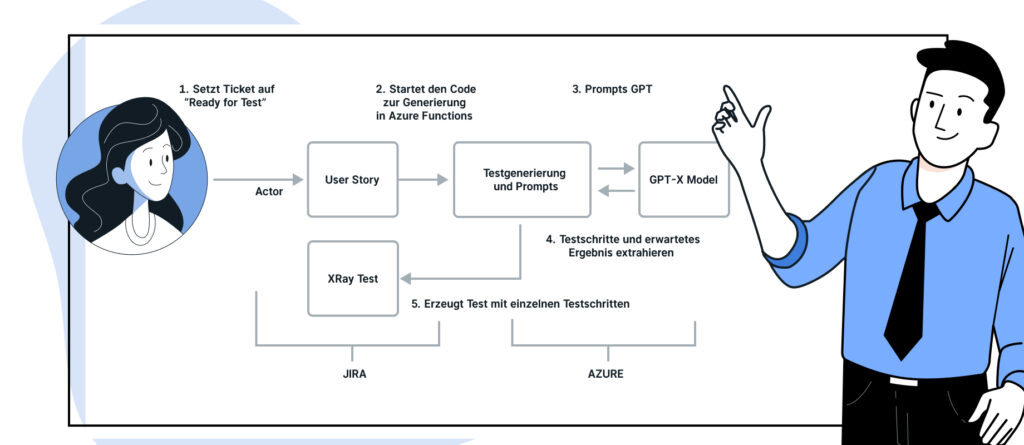
Once the requirements have been specified through requirements engineering, the tester marks the story as „Ready for Test“ to evaluate the requirements. At this point, Azure Functions comes into play with a hook on Jira. The hook detects the changes and forwards the story to GPT with an appropriate prompt. However, the quality of the generated results depends heavily on prompt engineering. This ensures that the responses are consistent and of high quality. There are now many guides available online on how to create effective and targeted prompts.
Based on the prompt, GPT generates responses that serve as individual test cases. These can either be created directly via the XRay/Jira API or, for now, simply added as comments to the story.
Finally, the generated test cases are displayed directly in the Jira ticket. We recommend controlling the entire automation process using keywords, for example, by adding tags such as „ai-generated-tests.“ These tags clearly indicate that machine-generated tests are involved. This gives users control over whether automatic generation should take place.
Conclusion
Our examples show that, at the current stage of development, there is no risk that testers will lose their jobs due to the use of AI. Rather, it becomes clear that AI tools help testers perform their tasks better and faster. It is important to recognize the respective strengths and combine them. While humans possess abilities such as intuition, AI tools are extremely fast and tireless, and also possess an enormous amount of general knowledge. Nevertheless, it is important to ensure compliance with data protection regulations when working with AI systems, especially when personal data is involved. In addition to personal data, intellectual property and copyright protection are also important issues and should always be taken into account. We are currently in the collaborative phase of AI development, which means that a human and a machine are very likely to achieve a better result than a machine or a human working alone.