
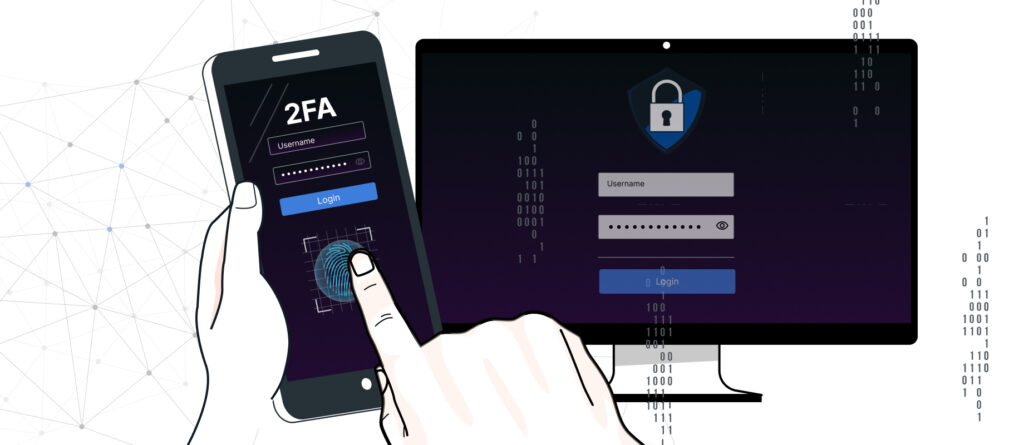
Multi-factor authentication (MFA for short) refers to multi-step procedures for electronic login or authentication in which users must provide two or more „factors“ (i.e., characteristics). The term refers to logging in to websites, software applications, or IT networks.
Why Use MFA?
For many years, it was common for users to authenticate themselves on websites or services using only a single factor—such as a password to access their personal email account, a PIN to access online banking, or a TAN for an online bank transfer. However, this is now considered too insecure. After all, it must always be assumed that users have weak passwords or simply reuse the same password across different services. This creates an increased vulnerability to dictionary attacks and brute-force attacks; password databases can be hacked, or debit cards can be stolen. See also our blog post on this topic „Password Security“.
As a result, more and more service providers are switching to MFA and requesting additional information from users. While „authentic users“ can easily provide this information, it is very difficult for cybercriminals to obtain it. In most cases, two factors are used (2FA = two-factor authentication). However, the use of three factors has also become quite common (e.g., password, device ID, and fingerprint).
Nevertheless, MFA is only as secure as the transmission medium. The third factor is also only useful if it is truly separate from the second factor. That is why, for example, it is not recommended to use the banking app and the Push-TAN app on the same smartphone.
MFA is designed to protect personal data from unauthorized access by third parties. This leads to the most common areas of application for MFA: banking, social media platforms, government agencies, insurance companies, and internal company access for employees. In many industries and government agencies, MFA is recommended or even required.
What types of factors are there?
The characteristics (factors) that must be provided for authentication can be classified into the following categories, which are currently in widespread use:
- Knowledge is defined as „something the user knows“—that is, information known only to the user. This includes, for example, a password, a PIN/PUK, or the answer to a security question. Knowledge-based factors are the easiest to hack.
- Possession refers to „something the user has“—that is, a physical object that only the user possesses. This includes, for example, a debit card, an ID card, a smartphone, a USB drive, or a dongle. This also includes one-time passwords (OTPs) sent to a cell phone or generated by smartphone apps. Possession factors are harder to hack, but they can be stolen, lost, or damaged.
- Inherence describes „something that is unique to the user.“ This includes, for example, biometric characteristics such as fingerprints, voice scans, facial scans, and iris recognition, as well as behavioral biometric data such as keystroke dynamics. Their advantage is that they cannot be forgotten or lost and are difficult to replicate. On the other hand, they cannot be changed if the underlying database is compromised.
- The user's location can also represent a factor type; for example, checking the IP address range from which the user typically logs in.
The authentication process might look something like this:
- A user enters a username and password to access an account.
- A second factor is required, such as a fingerprint, a PIN, or a one-time password (OTP).
- The user enters the requested factor, which is based on the information they previously provided when setting up the account.
How are the factors generated?
There is now a wide range of technical methods for generating the second factor for users or transmitting it to them. Some examples include:
- Smartphone apps (e.g., Google Authenticator, Microsoft Authenticator, TAN generator apps)
- Hardware TAN generators (In this case, a debit card, for example, is inserted, a barcode or QR code is scanned, and the TAN is generated)
- SMS for the mobileTAN process
- e.g., for online banking
- We do not recommend using text messages for this purpose, as they are sent unencrypted and can be easily tampered with or redirected. For this reason, many banks no longer offer this option.
- Web browser (add-ons, such as an authenticator app)
- Sensors
- Fingerprint Scanner: Fingerprints are „the same“ for approximately every 1 billion people.
- Facial Recognition
- Iris Scan
- Vein scan (a scan of the palm is even more secure than a fingerprint)
- Desktop Clients
- They know the secret and generate a code that is valid for a short time (e.g., KeePass)
- Key File
- Certificate (transparent to the user, who therefore does not need to take any action, since the certificate simply needs to be available at a known location)
- SSH Key
- Hardware
- Debit card (as a first factor in addition to the PIN)
- Electronic ID card (with card reader)
- Device Authentication
- The user is using a device with a unique, registered ID
Legal Regulations
At the European level, the revised Payment Services Directive 2 (PSD2) for payment service providers was adopted in 2015. Among other things, this requires banks, effective 2021, to ensure that transactions are authenticated using two independent factors from the categories of knowledge, possession, and inherence. For credit card transactions, there is the global PCI-DSS (Payment Card Industry Data Security Standard), which has required MFA, among other things, since 2022.
Disadvantages
In general, it should be noted that setting up these additional factors is usually complicated. Specifically, applications must be installed and linked to the user’s profile via a separate channel using QR codes. In some cases, this requires multiple devices and apps.
If you need to replace your hardware—for example, due to a malfunction or the complete loss of your smartphone—migrating the secrets involves a significant amount of work. If the key file is lost, all secrets must ultimately be reissued.
Conclusion
Digital security is of critical importance in today's world, as both businesses and users store sensitive information online. Therefore, unauthorized access to this data must be prevented. MFA serves as an additional layer of security to protect accounts from unauthorized access, even if a password has been stolen.
Sources
https://aws.amazon.com/de/what-is/mfa/
https://www.computerweekly.com/de/ratgeber/Multifaktor-Authentifizierung-Beispiele-und-Anwendungsfaelle-fuer-MFA
https://www.entrust.com/de/resources/faq/what-is-multi-factor-authentication-mfa
https://www.ibm.com/de-de/topics/multi-factor-authentication
https://www.itsb.ruhr-uni-bochum.de/themen/sichere_passworte.html
https://www.microsoft.com/de-de/security/business/identity-access/microsoft-entra-mfa-multi-factor-authentication
https://de.wikipedia.org/wiki/Payment_Card_Industry_Data_Security_Standard
https://de.wikipedia.org/wiki/Zahlungsdiensterichtlinie