The term “serverless” encompasses a wide range of technologies offered by the major cloud hosting providers: AWS, GCP, and Azure. In this blog post, our Xperts focus on one of the most important serverless technologies offered by each of the major cloud providers: Function as a Service (FaaS). This service provides a fast way to write code that focuses on the problem at hand rather than boilerplate, is highly scalable from the outset, and incurs costs based on usage.
Its inherent scalability and the close correlation between cost and usage make FaaS a particularly useful technology for use cases where workload varies significantly, such as in the IoT sector or for ETL workloads. It also offers a way to create an orchestration layer in front of existing backends, thereby enabling larger-scale transformations without disrupting users.
Comparison of Different Clouds
There are already thousands of articles explaining what FaaS is and why you should use it. The goal of this blog post is to compare the various offerings and provide a concise overview. As a technology provider with experience across all major clouds, we are in an extremely advantageous position to conduct such a comparison. Each cloud provider offers a slightly different technical implementation of FaaS, each with its own advantages and disadvantages. Therefore, such a comparison is particularly useful for deciding which provider is best suited for projects that make extensive use of FaaS. In the following, we’ll take a closer look at the FaaS offerings from each cloud provider (Google Cloud Functions from Google, Azure Functions from Azure, and Lambda Functions from AWS) and compare them across a number of key areas.
As part of this evaluation, we are focusing on the use case of developing a simple API whose purpose is to receive client requests, transform them, and route them to various backend services. In this use case, uptime is more important than in other FaaS use cases, such as batch processing or streaming events from IoT devices.
Runtime Environment
One of the pitfalls in developing systems that must function at any scale is designing them to be synchronous while ignoring the fact that most information flows in the real world are asynchronous. Take a conversation, for example: When one person is speaking, it’s not as if the other is doing nothing; at best, they’re listening; at worst, they’re ignoring what’s being said and thinking about what they want to say next. The standard approach should not be to create a chain of REST requests just to be able to provide users with an immediate response. That would be a particularly poor implementation: vulnerable and inflexible in the face of future changes.
FaaS makes it easy to design and implement asynchronous systems. The problem with asynchrony, however, is that it forces developers to think about concurrency. If the system can scale rapidly and the workflow isn’t necessarily directly tied to a user request (think, for example, of a queue of events that has been building up for an hour), then every part of the system must be designed so that it does not impair downstream systems through a DDoS attack.
Concurrency in Horizontal Scaling
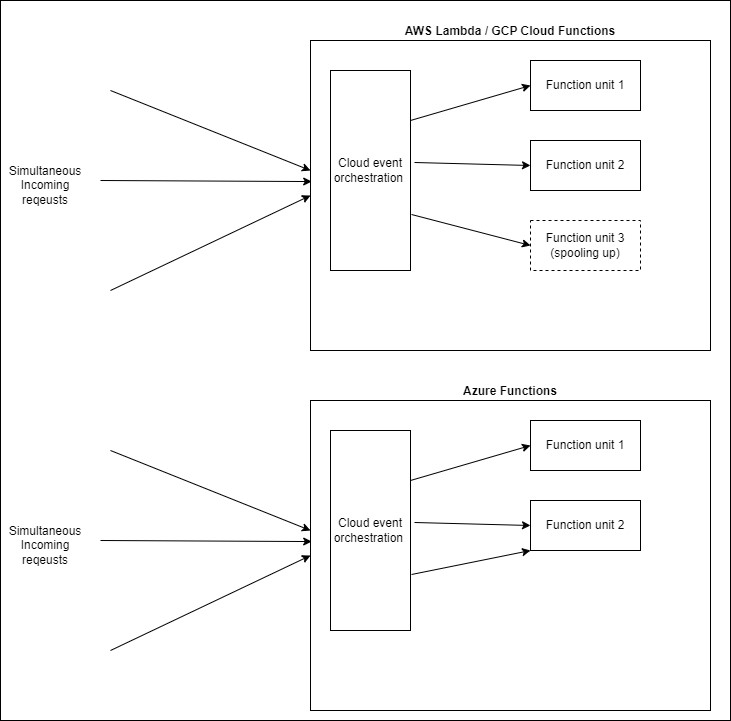
The execution environment of each unit in FaaS defines how it handles concurrency. And the unit is also a good starting point for our comparison. To take full advantage of FaaS, it makes sense to view each function as a nanoservice that provides a single functionality independently of other functions. While all three FaaS offerings allow developers to define the upper and even lower limits for scaling by units (horizontal scaling), these units exist at a different level of abstraction in Azure than in AWS and GCP. The configurable unit for FaaS in AWS and GCP, including its execution environment, is a single function. In the context of a REST API, this could be mapped to an endpoint. This makes it easy and natural to define scaling on an end-to-end basis—each function or endpoint can be configured and deployed independently of the others.
The configurable unit in Azure Functions is the Function App—a group of functions that are deployed together and function as a single logical unit. Returning to our example of the REST API, this could represent an entire REST resource (GET, POST, PUT, DELETE instead of just GET). This example immediately highlights a drawback of this approach: the POST endpoint cannot be scaled independently of the GET endpoint. Let’s assume the REST resource is /orders. In this case, creating new orders and retrieving existing ones would most likely have different scaling parameters. If creating orders were allowed at the same maximum rate as retrieving them, this could lead to problems in downstream areas.
Of course, this problem can be easily solved by placing the endpoints for retrieving and creating orders in separate Function Apps. However, it is important to understand this concept before deciding how to design each Function App.
Simultaneity within a unit
In addition to concurrency across multiple function instances, Azure Functions offers another way to handle multiple requests simultaneously: Simultaneity within each function itself. To understand what this means and why Azure offers this, a brief explanation of an important part of the FaaS lifecycle is needed: the cold start. Horizontal scaling comes at a cost: every time a function unit is created to handle traffic, it takes some time for it to come online. This is understandable: A completely new execution environment—JRE, Node instance, etc.—is spooled along with the function’s code and dependencies.
While all providers allow the reuse of existing units that are not currently in use, Azure Functions enables an existing function unit to handle multiple requests simultaneously (GCP offers this feature with Cloud Functions V2 is also available, but it is not enabled by default). This allows for efficient use of available resources, but at the same time poses a major problem if the function has any state at all. To illustrate: Imagine, for example, that every function execution is linked to a so-called correlation ID so that a process execution can be tracked in the logs across multiple parts of the system—a common pattern for distributed systems. This correlation ID is generated by a gateway and passed to the function via an HTTP header, and the function configures its logger to include it in every log entry it generates. As long as the application is in development and does not need to scale, this works smoothly. However, as soon as the traffic volume exceeds the capacity of the running units, Azure reuses the existing units concurrently. If no precautions are taken here, the new execution—which was started while the previous one was still running—overwrites the correlation ID, and both executions end up with the same correlation ID.
There are solutions for this as well: for a Node execution environment, this would be, for example, a asynchronous local memory, but since this behavior is enabled by default for Azure Functions, there's a very high probability that you'll encounter this issue for the first time in production.
Deployment
Deployment is relatively straightforward with any cloud provider. Each one has a CLI that allows you to deploy features directly, while IaC tools such as Terraform, CloudFormation, and Bicep offer a way to declaratively define the desired deployment state.
No downtime
The use case for our evaluation is a simple, usage-oriented API. Uptime is a key metric for such APIs. While asynchronous event processing functions can easily recover from brief outages if the event processing infrastructure has been configured accordingly, users cannot—and will not—wait indefinitely. AWS Lambda and GCP Cloud Functions come equipped with zero-downtime deployments out of the box. When a function’s code is changed or its execution environment is reconfigured (e.g., updating the Node version), requests are seamlessly transferred to the new function instance as soon as it is ready. The old instance is then deleted.
With Azure Functions, however, this is not the case. The Function App must be restarted after a deployment, which causes some downtime. Using a mechanism called Deployment Slots allows developers to avoid downtime when the deployment involves only code changes. However, if the configuration of the runtime environment is changed (for example, if the version of the runtime environment is updated), the slots are recreated and thus restarted, resulting in downtime. A truly zero-downtime deployment requires a more complex setup. Here, too, the abstraction level of the configurable unit is the weak link. Grouping the functions into a single Function App has led to two significant deployment issues:
- Deployments for any one feature in the app affect the lifecycle of all features in the app.
- The impact of this deployment is further exacerbated by the fact that there is no zero-downtime deployment.
Local Area
The ability to test FaaS locally is a key feature, since otherwise a cloud deployment would be required every time a change needs to be tested. This presents an interesting challenge for cloud providers, as they must build an installable environment that runs smoothly on a local computer. The challenge here lies in emulating the environment in which the functions are executed once they have been deployed to the cloud.
GCP offers the Functions Framework for this purpose, AWS offers a CLI tool called SAM (Serverless Application Model), and Azure offers its Core Tools.
Last but not least: an advantage for grouping functions
To return to our simple REST API: It consists of a set of resources, each of which has multiple endpoints. This means we want to develop, test, and deploy multiple functions (each serving a single endpoint) at the same time. This is where the concept of an umbrella Functions app comes in handy. The Azure Functions Core Tools framework can be installed as a development dependency and, upon launch, creates a local environment in which all functions defined in the Functions app are deployed. With a single command, developers get a local HTTP server with an endpoint for each HTTP function and an easy way to debug their code. The true strength of FaaS, however, is that functions can be triggered by almost anything, not just an HTTP request. We’ll go into more detail in the next section, but for now we’d like to mention just two examples of other useful function triggers: Event Hubs events or the creation of a database entry. The Core Tools framework also allows you to debug functions triggered in this way locally. This means that a message generated by an IoT device on the other side of the world can be consumed and debugged on a local computer. This is an extremely powerful and helpful tool.
Google's Functions Framework can also be installed as a development dependency, but it can only emulate one function at a time, which significantly limits its usefulness for running an API locally. One way to deploy all functions is to create a custom Express setup and serve each function within it using a custom script. In this case, however, the cloud runtime environment is no longer emulated.
The AWS SAM CLI takes a different approach. The CLI must be installed independently of the project and uses Docker to emulate Lambda functions. When running a local API, it combines the function code with the definition in the CloudFormation (IaC) template and runs a Docker container for each function in the API. This allows for a very accurate emulation of the cloud environment, but it requires a much more complex local setup than with Azure or GCP.
Integration with Other Services
As mentioned earlier, the real strength of FaaS lies in its flexibility: functions can be triggered by almost any other service offered by the cloud hosting provider. Our use case of a simple API barely scratches the surface of what’s possible.
Although a comparison of the PaaS (Platform as a Service) offerings provided by each cloud provider would be beyond the scope of this article, they do play a role in assessing the strength of each cloud’s FaaS offering.
Gateway
When building a system with publicly accessible REST APIs, a gateway is an almost indispensable tool for implementing cross-system standards and functions (API consistency, authentication, logging) and for providing an abstraction layer that separates the API from the technology used to implement it.
Both Azure and AWS offer very robust gateway solutions that integrate seamlessly with their FaaS products. In fact, AWS Lambda functions can only be triggered by an external HTTP call if an API Gateway has been configured for that purpose. Both gateway products allow you to define APIs using OpenAPI definitions (Swagger) and, in addition to JWT authentication, offer mechanisms for defining features such as traffic throttling and IP blacklisting. The API endpoints are configured for calling specific functions.
GCP comes out as the least mature of the three major cloud providers in this regard. It’s been a few years since we last took an in-depth look at configuring a gateway for an API based on Cloud Functions. At the time, Apigee seemed to be the only option, but direct integration with the Cloud Functions product wasn’t possible. Since then, Google has upgraded its offering with a product called API Gateway; however, we haven’t yet had the opportunity to test Google Cloud Functions with the new integration.
Event-driven
FaaS is event-driven. Function executions are triggered in response to events, such as an HTTP request, an event stream, a timer, or countless other things that can be tracked by the respective cloud provider. This promotes and supports the implementation of event-driven architectures and naturally leads to workflows in which the heavy lifting is handled by non-blocking functions.
With PubSub, GCP offers a wonderfully simple publish/subscribe service that allows developers to define topics where messages are to be published, as well as subscriptions for those topics that determine where those messages should go. Integration with Cloud Functions is not strictly necessary for the „Push“ subscription type, since functions can be treated as simple HTTP endpoints in this case. The service supports message filtering, allowing subscribers to select, via their subscription, the messages they wish to consume, as well as OAuth-based authentication between the topic and the subscription endpoint.
In AWS, EventBridge works similarly to PubSub. Instead of topics, EventBridge uses event buses (pipelines), and instead of subscriptions, developers must define rules that are evaluated every time an event arrives on the bus. A typical rule forwards the event to an HTTP endpoint or another AWS PaaS service such as Lambda.
The integration of Azure Functions with the rest of the Azure ecosystem is top-notch. Event-driven function triggers and outputs are defined as part of the functions’ source code. Configuring a function to listen to an Event Hubs stream, process the messages, and then publish the results to a downstream service of a different type, such as Service Bus, is as simple as making a few entries in a JSON file (when using TypeScript). This enables the rapid creation of asynchronous workflows in which each part of the workflow chain can access the technology best suited to its use case.
Conclusion
There are many other relevant aspects to consider when comparing the FaaS offerings of individual cloud providers—such as logging and monitoring—but they cannot be discussed further here due to space constraints. In conclusion, the FaaS offerings from the three major cloud providers represent an excellent opportunity for development teams to focus on business value rather than on infrastructure, scaling, and orchestration. None of the three cloud providers offers the perfect combination of features. GCP Cloud Functions provides the fastest way to create and deploy an API using only functions, whereas Azure Functions offers better tools and a more mature suite of IoT PaaS services with which it can integrate. AWS Lambda is similar but has a more complex on-premises setup, which slows down a team’s initial ramp-up. Depending on the specific requirements of the application, the three solutions can be evaluated based on the aspects discussed to select the appropriate cloud provider.